
Agentic AI in ERP is the move from AI that answers questions to AI that gets work done. For a small or mid-sized business, the ERP is where that matters most, because it is where orders, stock, invoices and payments live.
Why everyone is talking about AI agents
The shift is fast. In August 2025, Gartner predicted that 40% of enterprise applications would include task-specific AI agents by the end of 2026, up from less than 5% in 2025 (Gartner; reported by IT Brief).
But the same firm warned that over 40% of agentic AI projects will be canceled by the end of 2027, because of escalating costs, unclear business value or inadequate risk controls (Gartner; reported by SD Times).
So the question for a growing business isn't whether to use AI agents. It's where they pay off, what they cost, and how to keep them under control. This guide answers all three in plain language. If you are new to ERP itself, start with what an ERP system is.
What agentic AI actually is
An AI agent is software that is given a goal, works out the steps, uses your business systems to carry them out, and checks the result, asking a person to approve anything important. That's the difference from the AI most people have used so far.
| Rule-based automation | AI assistant (chatbot) | AI agent | |
|---|---|---|---|
| What you give it | Fixed rules: "if X, do Y" | A question | A goal: "collect overdue invoices" |
| What it does | Repeats the same steps | Answers or drafts text | Plans steps, uses tools, takes actions |
| Handles exceptions | No, it stops or errors | Explains, but doesn't act | Adapts, or escalates to a person |
| Example in an ERP | Email every invoice on its due date | "Which invoices are overdue?" | Find overdue invoices, draft tailored reminders, queue them for approval, log replies |
Beware of "agent washing": vendors rebranding existing assistants, automation tools or chatbots as agents without adding real agentic capability. Gartner estimates that of the thousands of vendors claiming agentic AI, only about 130 are real (SD Times). A useful test: does it take actions in your systems, or only talk about them?
How an AI agent works inside an ERP
Every agent runs the same loop: it takes a goal, plans, acts on your ERP data, and stops for a person's approval before anything final happens.
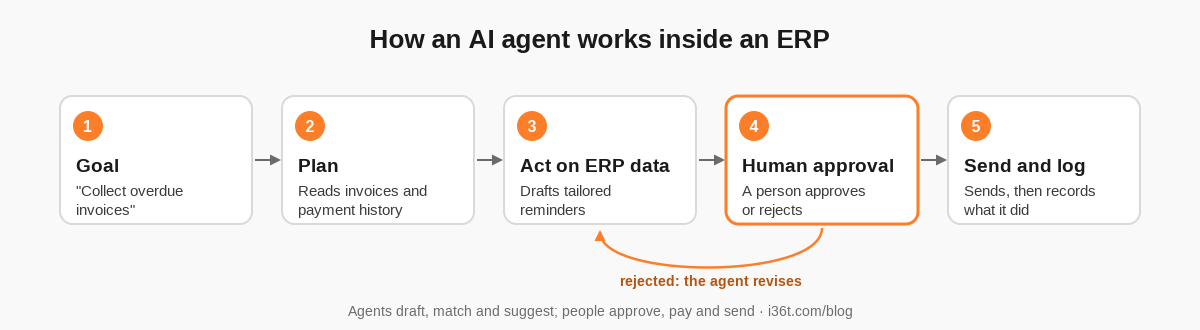
In the payment-reminder example, the agent reads overdue invoices and payment history, drafts reminders, and waits. If you reject a draft, it revises; if you approve, it sends and records what it did.
Where AI agents pay off in a small business
The best first agents handle frequent, rule-heavy work where a mistake is easy to spot and reverse. These are realistic starting points, grouped by department.
| Department | Task an agent can take on | Where a person stays in the loop |
|---|---|---|
| Finance | Match bank transactions to invoices and flag the ones that don't match | Approves unusual matches |
| Finance | Chase overdue invoices with reminders tailored to each customer's history | Approves before anything is sent |
| Purchasing | Read supplier invoices (PDF or email), create draft bills and match them to purchase orders | Approves bills that differ from the PO |
| Inventory | Watch stock levels and sales trends, then draft purchase orders before items run out | Approves each PO |
| Sales | Turn emailed or WhatsApp orders into draft sales orders with the right prices | Confirms the order |
| Customer service | Answer "where's my order?" from live order and delivery data | Takes over complaints and exceptions |
| Management | Summarize the week: sales, margins, overdue payments and stock risks, in plain language | Decides what to act on |
Notice the pattern: the agent does the gathering, matching and drafting, and a person makes the decision. That's where small businesses save the most time with the least risk.
What the major ERP vendors are doing
Every major ERP now ships an AI assistant, and agents are arriving fast. The catch is pricing: the assistant is often included, while agents and heavier use are increasingly limited by edition, metered or quoted separately.
| Vendor | Assistant | Agents and how they're priced |
|---|---|---|
| Microsoft Dynamics 365 Business Central | Copilot, included with the licence at no extra cost; Microsoft says fair-use policies, quotas or pricing might be introduced later | Ask your Microsoft partner for current terms |
| SAP Business One | Varies by version and partner | Ask your SAP partner for a quote |
| Oracle NetSuite | Text Enhance, included with the modules you licence | AI agents in phased rollout through late 2026; included per Oracle's announcement, with edition limits |
| Odoo | AI that scans vendor bills and expenses runs on paid in-app credits | "Agentic AI" listed in the Custom plan |
Sources: Microsoft Learn, ERP Research on NetSuite AI, Odoo pricing. As of November 2026.
For a small business, the practical lesson is to ask one question before turning on any agent: how is it billed, and what happens to the bill if usage doubles? Our comparison of ERP costs for small and mid-sized businesses goes further into licence and AI pricing.
Risks, and the guardrails that handle them
AI agents act on real money, stock and customers, so the guardrails matter as much as the features. These are the risks to plan for and how to contain each one.
| Risk | What can go wrong | Guardrail |
|---|---|---|
| Wrong action | An agent pays the wrong bill or sends a reminder to a customer who already paid | Human approval for anything that moves money or contacts customers |
| Bad data in, bad action out | Duplicate customers or wrong prices lead to wrong decisions | Clean master data before turning agents on |
| Too much access | An agent can see or change more than its task needs | Give each agent its own role with the minimum permissions |
| No trail | Nobody can tell what the agent did or why | Audit trails on every agent action, reviewed weekly at first |
| Runaway cost | Metered usage grows with volume | Flat pricing, or usage caps and alerts |
| Data privacy | Business data leaves your control | Know where the AI runs and what data it sends; prefer AI that works on your own records within your ERP |
| Hype over value | Paying for an agent that saves little time | Start with one measurable task and track hours saved |
A simple rule works well for most small businesses: agents may draft, match and suggest; people approve, pay and send. Loosen it only for a task the agent has handled reliably for weeks.
How to get started, step by step
You don't need an AI team to start. You need one clear task, clean data in one system, and a way to measure the result.
- Get your data into one place. Agents can only act on what they can see. If orders live in one tool, stock in a spreadsheet and invoices in another, start by bringing them into one ERP. Our ERP implementation and legacy migration guide shows how.
- Start with questions, not actions. Use AI to answer questions about your own records first, such as "which customers are slowing down their payments?" It builds trust and shows where the data needs cleaning.
- Pick one repetitive task. Choose something frequent and easy to check, like matching bank lines or drafting payment reminders.
- Write down the rules. What should the agent do, what must it never do, and when should it hand over to a person?
- Run it with approvals on. Let the agent draft and a person approve for a few weeks. Track hours saved and errors caught.
- Expand slowly. Once one task runs reliably, add the next. Keep approvals on anything that moves money.
- Review regularly. Check the audit trail and the cost every month, and switch off agents that don't earn their keep.
AI in ERP36T
ERP36T's AI works on your own records inside the ERP, within each user's own login and permissions, at a flat monthly price. It is optional and priced separately from the ERP plan, and it comes in three levels:
- AI Basic, $50 per month. Ask questions about your sales, customers, suppliers, stock, purchasing and invoices in plain language, in the ERP36T chat or on Telegram. For example: "Which invoices are more than 60 days overdue?" or "What were last month's top-selling items?"
- AI Advanced, $100 per month. Adds business insights such as trends and management summaries, scheduled checks with alerts on Telegram, and AI-assisted automation: it creates and updates records when a user asks, within that user's permissions. WhatsApp is available with integration.
- Agentic AI, quoted per company. A dedicated AI agent designed around your company's data, processes and workflows, priced according to the data sources, workflows, integrations, number of agents and security requirements involved.
Underneath, accounting, sales, purchasing, inventory, HR and the rest share one database, so the AI sees the whole business rather than one module. Role-based permissions, two-factor sign-in and an audit trail on every record apply across the system.
You can start with the ERP alone and add AI when your data is ready. See pricing or the platform for details.
Frequently asked questions
What is agentic AI in simple terms?
AI that is given a goal, plans the steps, uses your software to carry them out and checks the result, rather than only answering questions.
How is an AI agent different from a chatbot?
A chatbot answers and drafts. An agent takes actions in your systems, such as creating a draft bill or queuing a reminder, and hands exceptions to a person.
Is agentic AI only for large enterprises?
No. Small businesses often benefit sooner, because a few repetitive tasks take up a large share of a small team's time. The key is having your data in one system first.
Will AI agents replace my staff?
In practice they take over gathering, matching and drafting, so people spend more time on decisions, customers and exceptions.
Is it safe to let AI act on financial data?
It can be, with guardrails: human approval for anything that moves money, minimum permissions for each agent, and audit trails on every action.
How much does AI in an ERP cost?
It varies. Many vendors include a basic assistant and limit, meter or separately quote agents. ERP36T's AI is a flat $50 or $100 per month on top of the ERP plan, and a dedicated Agentic AI agent is quoted per company.
Where should we start?
With one frequent, easy-to-check task, such as bank reconciliation or payment reminders, with approvals switched on.
Start with your own data
The best way to see what AI can do for your business is to ask it about your own numbers. Book a demo, bring one real transaction, and see how ERP36T and its AI handle it. Not sure your data is ready? A free 30-minute ERP assessment will tell you where to start.
Related on i36t.com
More from the blog
See ERP36T run your own transaction
Book a free demo and watch one of your real orders, receipts or production runs go through ERP36T end to end.
Book a free demo